RDMS Authentication problems

Hello together,
we have the following szenario:
We are planning to integrate the RDMS in our company, to manage several RDM-Databases in different locations.
For testing reasons, i have a got an VM without connection to our Doamin.
I have installed the RDMS in v.2.5.2.0 and the RDM in v.10.6.3.0.
I have set up an IIS Website and an SQL Server 2014.
I was even possible to generate an Database through the RDMS Setup at the SQL-Server.
The Identity-settings for the RDMS Website-Application Pool are "NetworkService". I have granted "db_owner" permissions for "NT AUTHORITY\NetworkService" to the RDMS Database at our SQL-Server.
Because we have no Domain access at the moment, i have set up authentication permissions for "Devolutions Server custom user", "local machine user" and "Database user".
Now the problem is the following: If i try to login to the RDMS webinterface with ANY kind of user (i have tried any kind), i get the message "Login failed, ivalid user or password !". This happens with local users, DB users and also with RDMS users i have added through the RDMS console.
I have allready read some Threads and tried the solutions but the login still doesn´t work.
Can you guys help me out here ?
Thanks alot !
Best regards,
Florian Schneider
edited by FSchneider on 6/19/2015
Console.PNG
Webinterface.PNG
All Comments (11)
If i try to add a new datasource to our RDMS i got the following error:
Your login is valid but your user does not have any access for the datasource !
newdatasource.PNG
Hello,
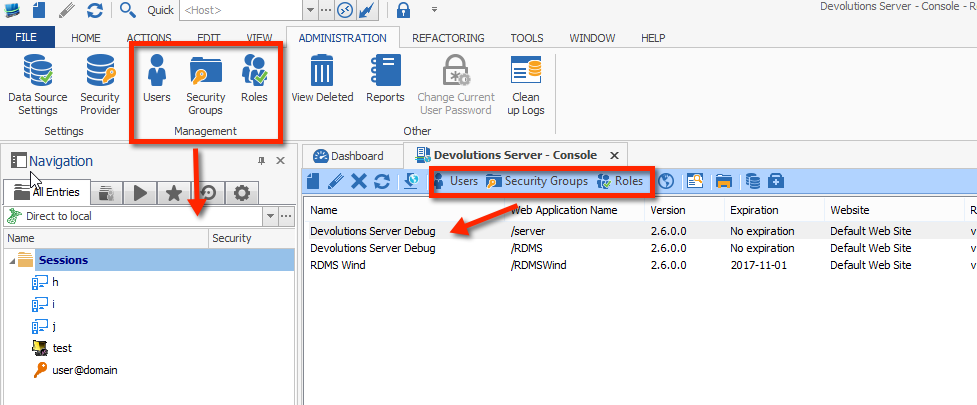
The screenshot for the user list is not for a DVLS instance because there is no Role tab.
Have you clicked on the user button IN the console?
The controls in the administration tab are for the current data source in your tree view, the ones in the console are for server instance.
Maurice
admin.png
Hi,
yes i used the button inside the embedded console window
edited by FSchneider on 6/19/2015

users.PNG
Hello,
So you have elected not to use domain authentication, thats why the role tab is hidden. I understand now.
In SQL Server, do you see the login activity from the identity you have set on the application pool?
Maurice
Hey,
i just tested the login with the "dbrunner"(Windows Local) user from last week. If i try to login with this user, the Login itself seems to work because the "Login failed, ivalid user or password !" message did not appear.
But now following error appears:

Time.PNG
Hi FSchneider,
We have an issue with the date/time format. If you change your date/time format on your server to the English USA Format, is it working?
Best regards,
Jeff Dagenais
Hey !
I have changed the date/time format from German to English (Great Britain) and restarted the server.
The error is still there.
Time[1].PNG
#Update:
After i changed the date/time format to Englisch (US) it seems to work now !!!
One last question ;).
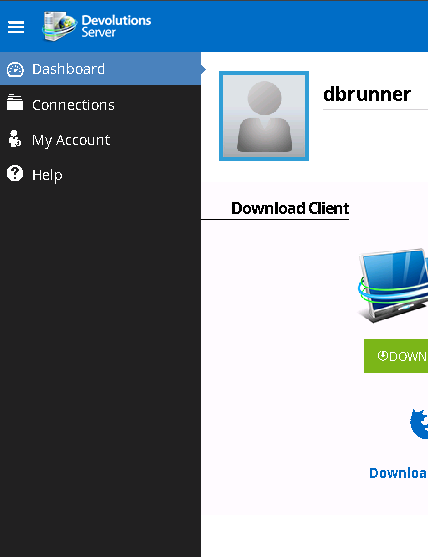
Since i can login to the webinterface now, i wonder were i can find the user/roles management in the webinterface:
interface.PNG
Hello,
Roles/Groups cannot be managed from the web interface, because it had been purposefully kept "light" to this day.
Version 2.5, which seems like a small release as for the features we've added, was in fact an important milestone because we changed the UI library that we were using. This is a stepping stone that will allow us to add features easily in the future.
The roadmap for Devolutions Server is exciting because we'll dedicate a lot of our resources and we have many ideas. I cannot say when you'll be able to manage everything with the web interface though.
Maurice
Hey Maurice,
thanks alot for the information ! I just asked because i see the pictures in the RDMS manual and wanted to know if something is missing in my installation.
Thanks for the support !