Only see part of the name of a credential

Hi,
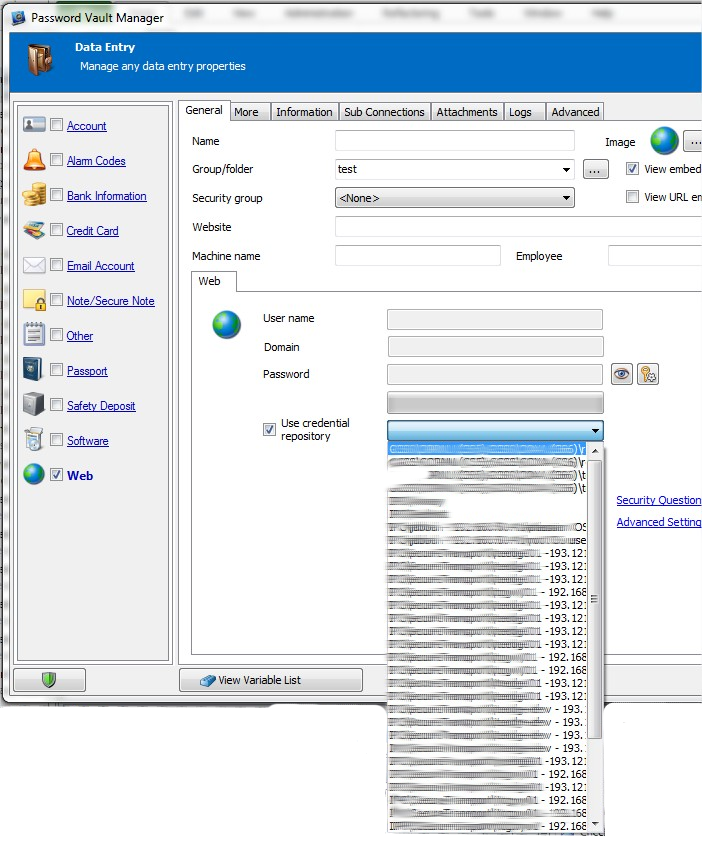
I am evaluating password vault manager for use in our company. For testing I added some credentials and now I want to create new Data Entries (of type Web) and use the credential repository such that I don't have to input the same credential multiple times. When using the dropdownlist for the credential repository it is quite unusable. Since I created a hierarchy to organize credentials the namings in the dropdownlist are wider than the list width. As a result it is almost impossible to find the correct credential. I would think there should be a button next to the dropdownlist (with for example 3 dots like ...) that gives a window that let you select the correct credential in an explorer-like fashion. This type of 'browsing' is used on other places in the app but it only seems logical that here it is used as well as currently it is not doable to efficiently select the correct credential as it is impossible to resize the dropdownlist. (Even enlarging the window doesn't help as the dropdownlist remains with the same width).
I am talking about the following window:
Is this already know? If so is there a nice workaround or a fix?
Kind regards
Password Vault Manager_6.png
All Comments (5)
Hi,
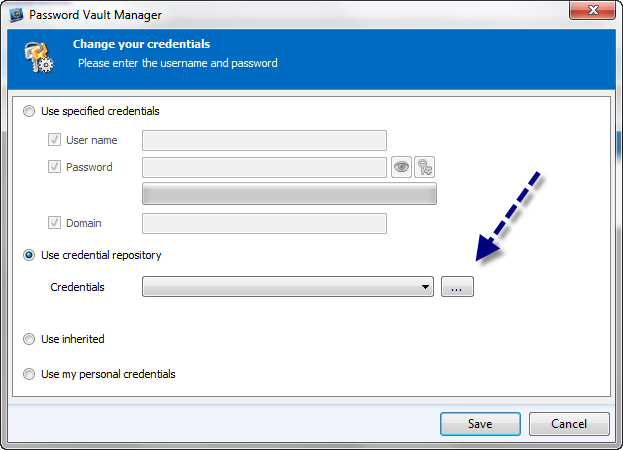
You're right and the ... button is missing. I will add this for the next minor update. In the meantime you could use the batch edit as a workaround
David Hervieux
Batchedit.png
Hi,
It's fixed and it's available in PVM 5.1.2.0
http://passwordvaultmanager.com/Home/Download
Regards
David Hervieux
Hi, I verified it and it is indeed a workable solution.
Thank you very much!
You can also install the new PVM release
PVM 5.1.2.0
http://passwordvaultmanager.com/Home/ThankYou?f=PVMsetup
David Hervieux
Yes indeed completely solved in new version! Thanks!