Unable to connect to datasource

Using RDMS 2.2.8.0 And RDM 9.1.2.0
I have set up a RDMS on an existing RDM database.
The web UI works and i can login as user there.
But when trying to start RDM against the RDMS datasource i get this error.
System.web.services.protocols.soapexception: server was unable to process request
---> System.NullReferenceException: Object reference not set to an instance of an object at Devolutions.RemoteDesktopManager.Server.ServerCacheManager.<FilterforVersion>b
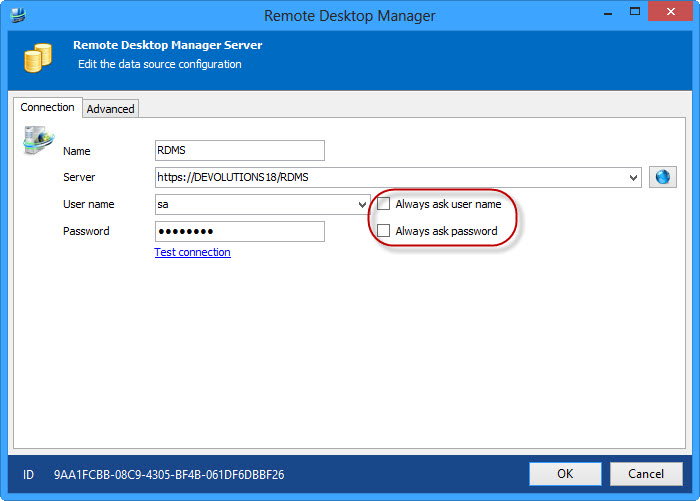
Also, is it possible to get the application to use the logged in user & password when starting RDM.
I do not want my users to need to enter the password again.
// Stefan Ackelman
All Comments (2)
Stefan,
Very odd, not sure why you would get this. I will need your help in diagnosing the issue.
Please do the following, you can send me the info via private message or email (slavergne at devolutions dot net) if you like.
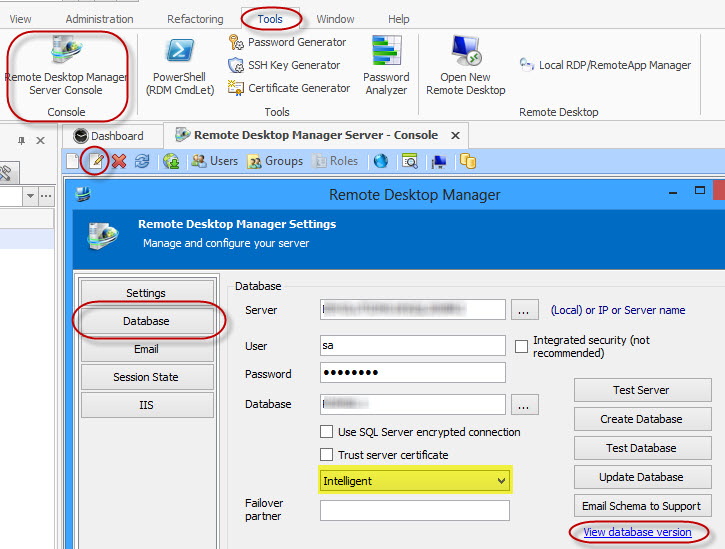
- What is the version number of the RDMS database? Tools -> Remote Desktop Manager Server Console -> Edit -> Database -> View database version
- What is the caching mode? (label is missing in the UI, see highlighted section of screen shot)
No, it is not possible. The only option you have is save them in the data source. Uncheck the following:
Stéfane Lavergne
2-13-2014 1-49-26 PM.jpg
2-13-2014 1-44-21 PM.jpg
Database Version 91 & Intelligent Caching