Assign Users to roles based on Office 365 Group membership

Is there a way to create roles that are linked to Office 365 groups.
So we can keep RBAC(Role-based access controls) consistent across our other cloud applications.
All Comments (12)
Hello,
It's possible to accomplish this using Password Server as your backend datasource.
For more information on this product, please consult https://server.devolutions.net/
Best regards,
Jeff Dagenais
Jean,
Thank you, we do have a Password Server set up as our datasource in an HA pair. Is there more specific instructions or guide.
The link provided is to the general product page.
Brian
Hello,
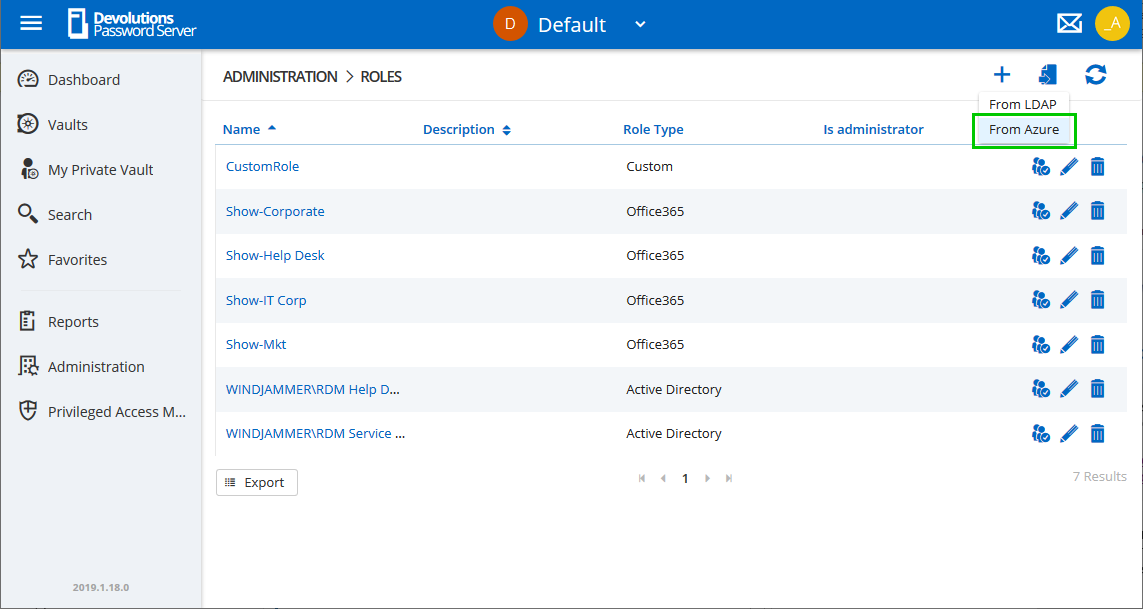
Here is how you can bind Office 365 Groups in DPS. We will update our online documentation about it.
From the DPS web UI, please go in Administration - Roles and click on the Import button and select Import from Azure.
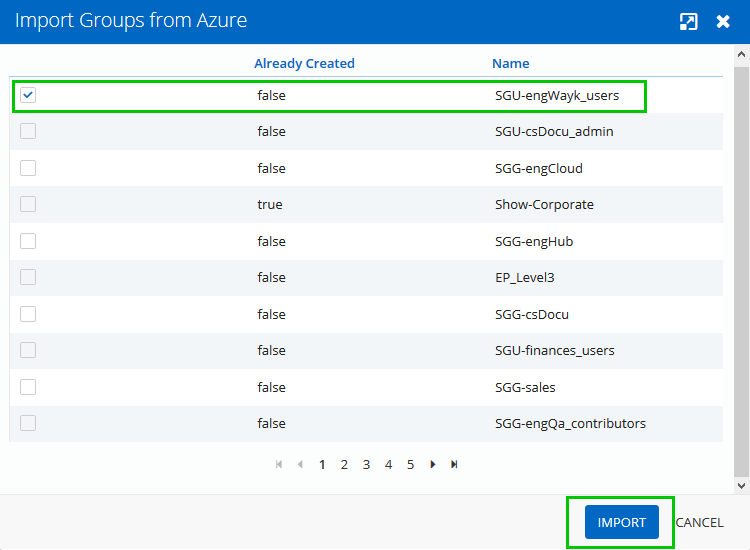
Then, select the group and click on the Import button.
Then, you can grant permissions to the imported Office 365 groups. Here is the online documentation about assigning permissions.
https://helpserver.devolutions.net/securitysystem.htm#entry-configuration
Best regards,
Érica Poirier
2019-07-18_08-41-03.png
2019-07-18_08-33-00.png
Thank you Erica, I had tried here but i do not see any groups listed. We are only using Azure for authentication. Here is what i see. attached image. It is a blank screen. Is there something missing from the permissions for the app registration in Azure?
I do see my office 365 groups available when i search for them within Azure Active Directory. however that is not relaying through to DPS.
I followed the guide. along with the change that we had to do azure legacy app registration.
Also attached is the API permissions that show that read all groups is allowed in azure for the app registration.
Thank you.
Azure_import.PNG
API_Permissions_AZure.PNG
Hello Brian,
You have set the right permissions.
It is maybe a problem with the Scheduler. Do you have any relevant error messages in the DPS logs?
Best regards,
Érica Poirier
Erica,
I do see this message in the logs. I am running in a HA pair of Vm's the "DevolutionsScheduleService" is running on both servers/
It set to refresh the cache every 30 minutes. i did a test connection and it shows working, and the service shows running.
ArgumentNullException - Value cannot be null.
Parameter name: key
at System.Collections.Generic.Dictionary`2.FindEntry(TKey key)
at Devolutions.Server.Managers.ADSync.GroupMembershipManager.BuildGroupTreeRecursive(Dictionary`2 groupTree, List`1 groupsToIterate, GroupTreeItem parentTreeItem, IGroupMembershipExtractor extractor)
at Devolutions.Server.Managers.ADSync.GroupMembershipManager.BuildGroupMembership(List`1 allGroups, IGroupMembershipExtractor extractor)
at Devolutions.Server.Managers.ADSync.GroupMembershipManager.AssignGroupsToUsers(String domainName, Dictionary`2 finalUsers, List`1 allGroups, IGroupMembershipExtractor extractor)
at Devolutions.Server.Managers.ADSync.GroupMembershipManager.ExtractUsersAndGroupsForDomain(IGroupMembershipExtractor extractor)
at Devolutions.Server.Managers.ADSync.AzureCacheManager.SyncAzure()
I have also tried clicking the reset server cache under the DPS web gui.
Administration--> Reset Server Cache
Checked the Office 365, and users boxes.
Hello,
Just to let you know that we will soon update our online documentation about how to configure the new Azure AD App Registrations with DPS.
In the meantime, only one VM needs to run the DevolutionsSchedulerService.
Best regards,
Érica Poirier
Hello,
After a discussion with an engineer, it seems that the Name property of one of the Azure AD groups is not set or is empty.
Could you please verify this and let me know if you have found such group?
Best regards,
Érica Poirier
Erica,
The domain has 1,000's of user groups across the enterprise. Are you asking to validate all of them for Name properties?
Or another way of stating this would just one group entry with invalid/Missing name cause DPS to invalidate all entries?
Brian
Hello,
@everyone, a ticket has been sent to our engineering department about managing groups with empty name. As we speak, this has been resolved internally and we are waiting for an internal version to test. Once the fix will be available, we will update this thread.
I will move this thread in the DPS section.
Best regards,
Érica Poirier
Hello,
@Brian an internal version is available with the fix to manage Azure AD groups with empty name. If you are interested to test that beta version on a staging environment, please let me know and I will share a link to download it.
Best regards,
Érica Poirier