Unable to connect to Wayk Den

Hi,
it's been a week that I cannot connect to Wayk Den, it keep saying "connecting to Wayk Den..." and then "Disconnected from Wayk Den..."
Previously it worked fine.
I am using v3.1.1 Free
What can I do to troubleshoot this?
Thank you,
Roberto
All Comments (16)
Hi Roberto
Are you running the standalone Wayk Now client, or did you install using the .msi (on Windows)?
If you can capture a log file for us, it will help us understand the problem. Assuming you are using the Windows version, go to File > Options, and then navigate to the "Advanced" tab. Change the logging level to "Debug", click OK and then close and relaunch the application.
You can wait a few moments for the client to try and connect. Then send us the log file, which should be in %APPDATA%\Wayk\Logs (you can also find it by returning to Options > Advanced and choosing "Show in folder").
When you have a log file, you can send it to to me via PM, or email to support@devolutions.net and we will follow up.
Sorry for the inconvenience. If you have other questions or problems, please let me know
Thanks,
Richard Markievicz
Well, magically it works now...
In any case I am using .msi x64 version.
Should I have still problems, I send you the logs.
Thank you,
Roberto
Hi Roberto
Thanks for the update, and glad that it seems fixed.
You can try to change the logging level to "Info", so the log file does not grow too large. And then if you have the same issue again, you can send us the file (as above), and we will be able to diagnose the issue.
If you have any other question or problems, please let us know
Richard Markievicz
I have the same problem for a week now. Happens every now and then. the logfile is in attachement.
Siegfried
WaykNow.log
Hi Siegfried
I'm sorry to hear that you're having problems with the Wayk Den connection. Thanks for sending over the log file. It does sound like your issue is the same as Roberto, and we'd like to fix that.
I think that the issue probably lies with the unattended component. If you can capture the log from there, it would be very helpful.
First of all, you can stop the Wayk Now service. Either open Services.msc and stop the "Wayk Now Unattended Service", or open an administrator command prompt and run `net stop wayknowservice`.
Next, enable logging by running the following command from an elevated command prompt:
wayk-now config --global LoggingLevel 1
Finally, start the service again - either through Services.msc, or by running `net start wayknowservice` from your elevated command prompt.
It's possible that restarting the service will fix your connection. However, you can leave the logging enabled and the next time the disconnection issue occurs, please send us the log files from %PROGRAMDATA%\Wayk\Logs.
You can either attach to another post, or send to support@devolutions.net.
The log file should not grow too large, but for your information, you can disable logging by following the steps above and setting the logging level to `6` (which corresponds to OFF).
I'm sorry for the inconvenience. If you have any questions or further problems, please let us know.
Richard Markievicz
Hi,
Just letting you know that we didn't had any connection problems in the last week.
Siegfried
Hi Siegfried
Thanks for keeping us up-to-date!
Richard Markievicz
I'm not able to start a session. Automatically changes to disconnected from wayk den. I'm on a Mac. Just downloaded the new version
please help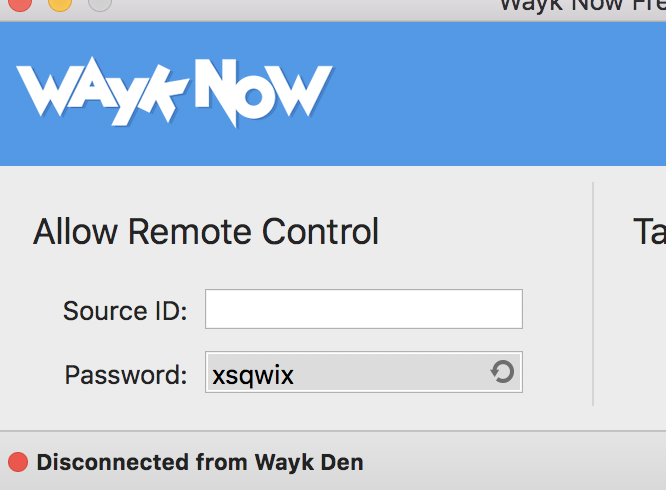
Screen Shot 2020-10-10 at 1.45.02 PM.png
Hello
There's not any reported issue or service disruption with Wayk Den currently. To diagnose the issue, please provide a debug log by following these instructions:
- Go to Wayk Now > Preferences; under "Advanced" set the "Logging level" to "Debug". Then press "OK".
- Close Wayk Now by choosing Wayk Now > Quit Wayk Now
- Now relaunch the application and try again
If the problem persists, navigate back to the preferences window "Advanced" tab. Click the button "Show in folder" to locate the log file (WaykNow.log).
You can send it to me via PM, or to wayk@devolutions.net.
Please let me know if you have any questions!
Thanks and kind regards,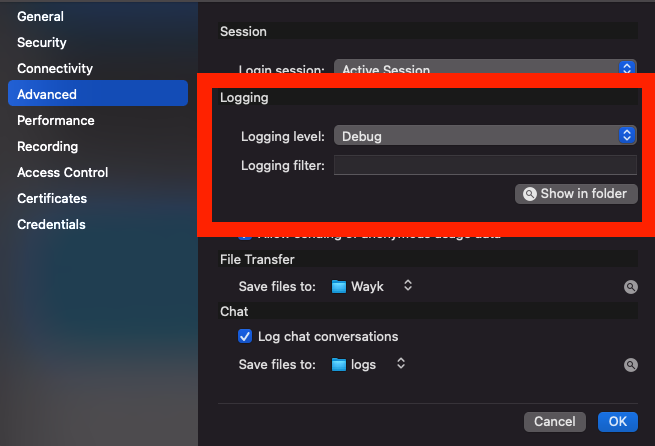
Richard Markievicz
Screen Shot 2020-10-10 at 12.04.13.png
Hello
Thanks for sending the files I asked for. I see the error that's preventing your machine from connecting; but I'm not sure of the cause.
Are you signed in to Wayk Den with a Devolutions Account (under Preferences > Connectivity, it should show your login status)?
Please can you compress your application directory and sent it via PM? Open Terminal.app and run the following command:
zip ~/Desktop/wayk.zip ~/Library/Application\ Support/Wayk/ -r
(You can copy and paste the command into Terminal and just press "Enter")
It will generate a file named "wayk.zip" on your desktop that you can send to me.
To unblock things, you can also try to reset the certificate manually. Quit WaykNow and run this command:
mv ~/Library/Application\ Support/Wayk/server ~/Library/Application\ Support/Wayk/server.bak
Then restart Wayk Now and see if you can connect. Note that this will cause the 6-diigt Wayk ID to be reset.
Please let me know any questions
Thanks and kind regards,
Richard Markievicz
I don't think my email response went thru.
here it is
yes, I am signed/logged into my devolutions account.
I've attached the zip file.
I'm not clear where you want me to run this command:
mv ~/Library/Application\ Support/Wayk/server ~/Library/Application\ Support/Wayk/server.bak

let me know
Thank you
Hello
I'm sorry for the inconvenience; please note that you can't respond on forum by replying to the email notifications. You have to respond via the forum web interface.
The forum software will also have removed your attachment; because it likely contains personal data.
You can send to me via PM, or to wayk@devolutions.net.
As for the command to try and resolve the issue, simply:
- Ensure Wayk Now is closed
- Open Terminal.app, paste the command exactly as written, and press "Enter"
- Restart Wayk Now
mv ~/Library/Application\ Support/Wayk/server ~/Library/Application\ Support/Wayk/server.bak
Please let me know any further questions!
Thanks and kind regards,
Richard Markievicz
Hello again
We have managed to reproduce the issue locally; don't worry about sending the .zip file.
Wayk Now identifies itself with Wayk Den using a certificate, which is issued with a validity of 3 months. Once there is only 1 month of validity left on the certificate, Wayk Now will start trying to renew it. However - there is a bug in Wayk Den: if the certificate is allowed to completely expire, renewal may not be possible.
This seems to be what happened in this case - was it a long time (1 month or more) since you tried to use Wayk Now on this machine?
We are working to correct the bug in the next release of Wayk Den.
In the meantime, you can fix this by deleting your local certificate; and that is done by running the command I wrote in my previous post.
If you're more comfortable making the change through Finder; you can press [Command]+[Shift]+G to open the "Go to folder" dialog. Navigate to this path:
~/Library/Application Support/Wayk
And delete or rename the "server" directory in that folder.
(The command I gave before simply renames that directory to "server.bak").
Please let me know any questions or issues.
Richard Markievicz
I have the same problem! I've installed the latest update, has fix already been applied to the latest version? Also the instructions you provided last regarding deleting a folder apply to Mac OS, is the same true for Windows computers becasue y computer is Windows 10 Pro on a domain environment and I'm also having the same issue as discribed by the OP.
Actuallly, I figured it out with the general idea of the mac folder. On windows computers the "C:\ProgramData\Wayk\server" needs to be deleted or renamed, didn't bother stopping or starting any services, just rename the folder and within seconds you'll see a new one and Wayke Now will have a new source ID and should be connected to Wayke Den. You will still need to re-register the computer for unattended access again.
Hello,
The issue is on Wayk Den server. If you use your own Wayk Den server, we didn't release a version with that fix yet. A new version is already planned for next week. If you use the public Wayk Den (https://den.wayk.net), an update is planned tonight to fix that issue. In all cases, In the meantime, as Richard said, you can delete your certificate and a new one should be created.
From your last message, I understand that it works now. Please let us know if we can help with something else, otherwise, the fix will be available next week with the new version.
Best regards,
François Dubois