How to setup a custom command line for VPN

Hello,
I am trying to setup a custom VPN connection via command line for Checkpoint SecuRemote. I have verified that I can connect to the VPN using the following command:
c:\Program Files (x86)\CheckPoint\Endpoint Connect\trac.exe connect -s <host_name> -f "<cert_path>" -p <password>
And when finished, disconnect using:
c:\Program Files (x86)\CheckPoint\Endpoint Connect\trac.exe disconnect
How do I create a custom VPN that executes these commands using RDM?
Chad
All Comments (5)
Also, I see that there is an entry for CheckPoint EndPoint Security VPN which seems like it would work for this type of VPN, only it is missing the "p12" parameter which is -f at command line and allows us to connect using a P12 SSL certificate instead of a username/password combo.
Hello,
I will verify with our engineering department if it's possible to update our add-on to support your needs.
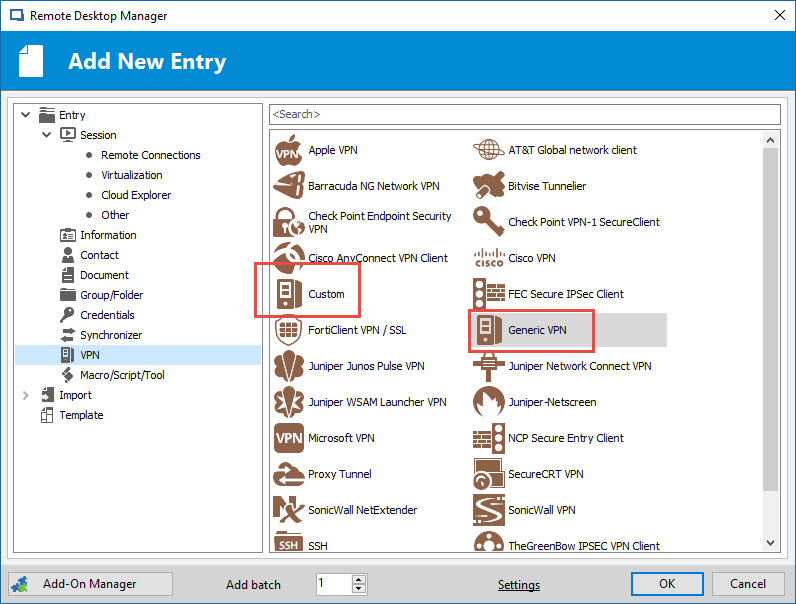
As of now, you can try our Custom VPN entry or Generic VPN entry. You should be able to accomplish what you want using one of those two entries
Best regards,
Jeff Dagenais
2017-03-10_14-01-39.jpg
Hello,
I've made a few changes to the checkpoint endpoint security VPN add-on and it can now specify the p12 certificate path and send the p12 password too.
I attached the new version of the add-on to this post. To install it you can extract the dll to %LocalAppData%\Devolutions\RemoteDesktopManager
We would appreciate if you could try it out and give us some feedback.
Regards,
Hubert Mireault
VPN3.0.28.0.zip
Hubert-
This update worked perfectly! Thanks so much for the update!
Chad
That's great to hear, thank you :)
Regards,
Hubert Mireault