Programmatically assigning various credentials to entries

Hello,
For backwards compatibility concerns, our entries have a single field to specify which credentials to use when authentication is required. For this reason we have a set of "well known" identifiers that indicate special cases that are handled by our products.
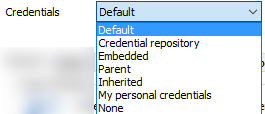
To use a specific credential entry, just set the CredentialConnectionId field to its ID. To use other values as per this dropdown, use the values below.
Default = "" (Empty string)
Credential repository paired with --- Prompt on connection --- = "45479560-173E-435D-8848-C22F863FDC96"
Embedded = for backwards compatibility only, I wont list it here.
Parent = "E2CC9029-CA3A-4308-BA54-16D5029BC8ED" (only for sub-connections)
Inherited = "1310CF82-6FAB-4B7A-9EEA-3E2E451CA2CF"
My personal credentials = "9F3C3BCF-068A-4927-B996-CA52154CAE3B"
None = "B87B29D9-9239-4D7B-86D8-9B53DCD3BA9F"
Private Vault Search = "88E4BE76-4C5B-4694-AA9C-D53B7E0FE0DC"
Maurice
credtypes.png
All Comments (9)
Thank you for your explanation,
But after i tried this I get this Errormessage when I want to edit an entry: Unable to find the credential Entry, this setting will be lost.
I tried to set credentials to Embedded and after that to Inherited. Both didnt Work.
I dont know if i chose the wrong way to adjust these settings.
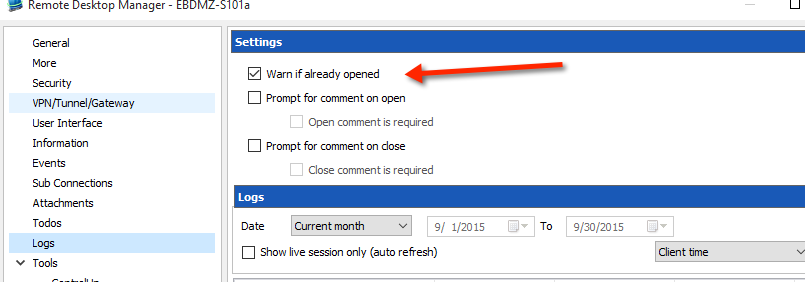
For the other setting i used "$session.Events.WarnIfAlreadyOpened = $true" which worked.
$session.CredentialConnectionID = "1310CF82-6FAB-4B7A-9EEA-3E2E451CA2CF" didnt work.
Greetings
Hello,
I have tested exactly as per https://forum.devolutions.net/topic18904-how-to-programatically-change-group-fiolder-properties-and-session-properties.aspx#post72155 and it worked.
Please send us the script at support@devolutions.net so we can investigate. Include the version of RDM that you are using. Setting to embedded was not included in my topic, where did you get the GUID?
Best regards,
Maurice
Hi,
I tried it with embedded but of course that didnt worked because i dont got the ID.
cls;
Write-Host;
Write-Host "Fixing SSH sessions"
Write-Host;
$SelectedSessions = Get-RDMSession | where {$_.Name -match "EBDMZ-S101a"}
foreach ($session in $SelectedSessions)
{
Write-Host (" Processing : " + $session.Name);
$session.Events.WarnIfAlreadyOpened = $true;
#$session.OpenEmbedded = $true
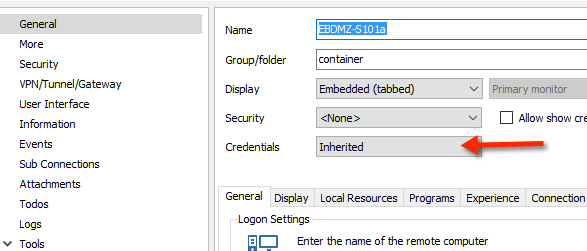
$session.CredentialConnectionID = "1310CF82-6FAB-4B7A-9EEA-3E2E451CA2CF"
Set-RDMSession $session;
}
Write-Host;
Write-Host "DONE!"
Write-Host;
Thats how I tried it with the "inherited" setting. My RDM Version is 10.6.5.0, should I still send the Script above via Mail?
Thanks and regards
Hello,
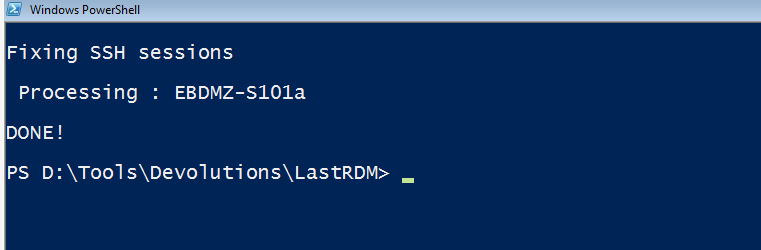
And just to confirm, when you run the script, you see something like...Fixing SSH sessions Processing:EBDMX-S101aDONE!
correct?
Maurice
Yes thats the Output i See.
well, it works as is
Please contact us at support@devolutions.net, we will have to do a session to resolve this.
Best regards,
Maurice
ps3.png
ps2.png
ps1.png
Hi,
Im sorry I didnt answer until now.
I think i could better test this with non productive Datasources, but my Problem is i dont know how I chose a specific DataSource to set these Settings.
Would it be possible if i list the Settings i want to use and you help me to set these?
Im grateful for your Help.
Regards
Hello,
One of the critical command performed by Tools - Powershell (RDM CmdLet) is to set the current data source. it usesSet-RDMCurrentDataSource -ID "1a1a1a1a-1a1a-1a1a-1a1a-1a1a1a1a1a1a"
with your data source ID taken from the data source properties, it is only visible in Edit mode.
I will post a list of properties in a sticky topic of this forum in a little while.
Best regards,
Maurice
Hello,
Here is a cmdlet that will show you the list of registered data sources and allow you to choose one to set as Active.cls$curds = Get-RDMCurrentDatasource$listds = Get-RDMDatasource$idChoice = 1$nl = [Environment]::NewLine$inputMSG = "Which Datasource do you want to use?$nl$nl"foreach ($ds in $listds) { $dsName = $ds.Name if ($ds.ID -eq $curds.ID) { $inputMSG = $inputMSG + "$idChoice- $dsName****CURRENT****$nl" $curChoice = $idChoice } else { $inputMSG = $inputMSG + "$idChoice- $dsName$nl" } $idChoice++}$inputMSG = $inputMSG + $nl [System.Reflection.Assembly]::LoadWithPartialName('Microsoft.VisualBasic') | Out-Null$answer = [Microsoft.VisualBasic.Interaction]::InputBox($inputMSG, "Select your Datasource....", $curChoice) Set-RdmCurrentDatasource -ID $listds[$answer-1].IDGet-RDMCurrentDatasource
Best regards,
Érica Poirier