Windows keypass-through doesn't work with combo keys

If I hit the Mac command key in a session, RDM Mac sends the Windows key. That's good.
But how do I get Windows-X (for the power user menu in Server 2012/2012R2 and Windows 8.x)?
What about Windows-E for File Explorer?
"Half" a Windows key is more frustrating that no Windows key.
All Comments (4)
Hi
I will verify with Benoit but I think that I remember something about the Windows key and the shortcut. We will get back to you quickly.
David Hervieux
Hi,
I verified the list of windows shortcuts (I found them here: http://windows.microsoft.com/en-ca/windows/keyboard-shortcuts#keyboard-shortcuts=windows-8).
From that list I found theses one are not working properly:
Win+C
Win+H
Win+K
Win+spacebar
Win+ctrl+spacebar
Win+tab
win+ctrl+tab
Win+shift+tab
Win+V
Win+Shift+V
Win+X
Win+number depend if you have a screen shot shortcut
Win+shift+number depend if you have a screen shot shortcut
Win+/
Win+alt+enter
For most of them there is a conflict between Mac OS and Remote Desktop Manager and in that case the OS always win.
Cmd+c, x, v, a are a special case, we intentionaly intercepted them to make them work as if you were using a Mac to make it easier for people used to work on a Mac. We could add a setting to make people choose if they want to control the clipboard with the Mac shortcuts.
Are you looking only for the shortcuts including the c, x, v, a keys or are you looking for other shortcuts?
Thank you
Benoît Sansregret
Win-X. This key brings up the "power menu"
Hi,
I just realized that there is a setting to disable the Mac shortcuts for the clipboard (Cmd+c, x, v, a)
if you uncheck this checkbox the Win+x shortcut makes the Power user menu appear
Hope this helps
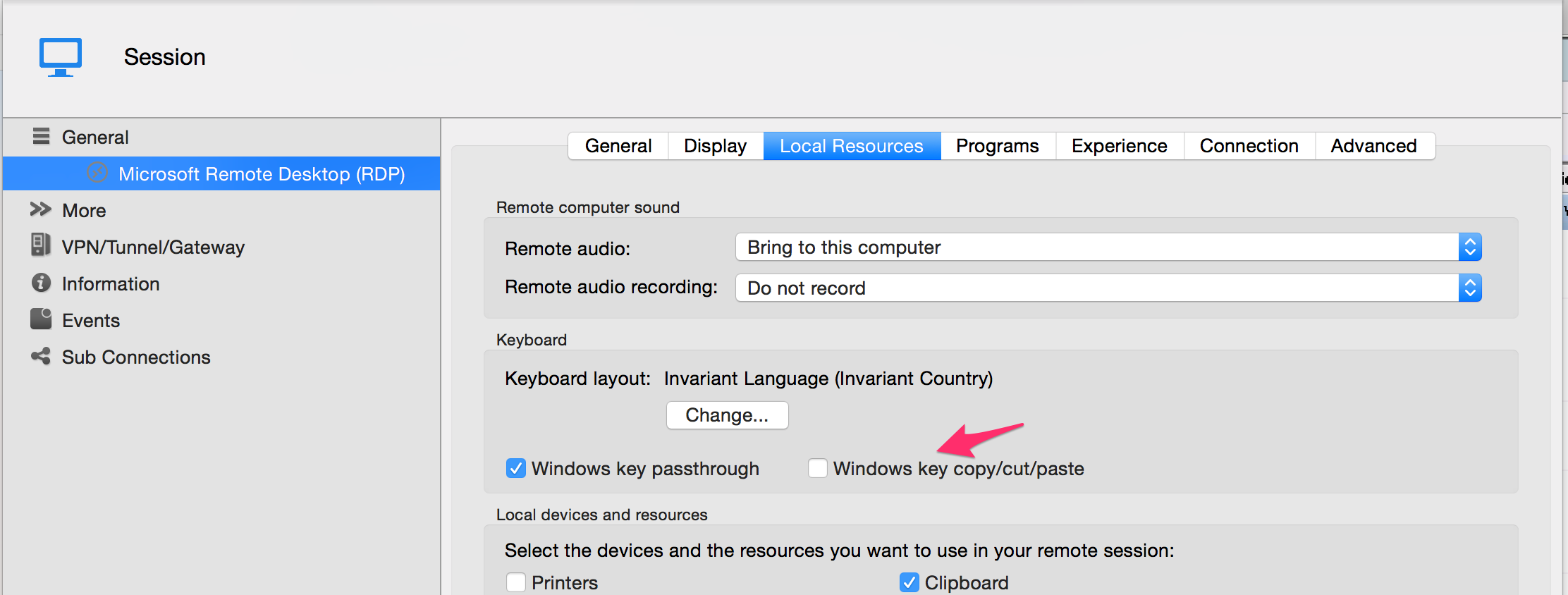
Benoît Sansregret
DisableClipboardShortcut.png