RDM crash continiously

Win 7 64bit
When working with RDM it crashs while starting a session.
Following error message:
Problemsignatur:
Problemereignisname: APPCRASH
Application Name: RemoteDesktopManager.exe
Application Version: 6.6.0.0
Application Timestamp: 4ea4c14a
Fault Module Name: KERNELBASE.dll
Fault Module Version: 6.1.7601.17651
Fault Module Timestamp: 4e211319
Exception Code: ee05ff6e
Exception Offset: 0000b9bc
Betriebsystemversion: 6.1.7601.2.1.0.256.48
Gebietsschema-ID: 1031
All Comments (17)
Do you get an error message from RDM or just from Windows?
David Hervieux
No error messages for the crashes from RDM - only from Windows.
Can i change the debug lebel under options/advanced? At the moment debug level = 0
Yes you can and you can also verify the application log in Help->Application Log. what action are you doing when the application crash?
David Hervieux
The action is: Open a session whith doubleclick from the navigationtree.
After doing this the Windows message "The program does not response" (i don't know the text in english) pops up. In the Detail Information you see the message from my first post.
I set my Debug Level to 5.
It crashes not every time. When i have a crash i post the messages.
Could you try the latest beta version?
David Hervieux
ok i test tomorrow
New Version - same Problem:
Double Click on a Session to open it.
Problemsignatur:
Problemereignisname: APPCRASH
Anwendungsname: RemoteDesktopManager.exe
Anwendungsversion: 6.9.0.0
Anwendungszeitstempel: 4ef35a01
Fehlermodulname: KERNELBASE.dll
Fehlermodulversion: 6.1.7601.17651
Fehlermodulzeitstempel: 4e211319
Ausnahmecode: ee05ff6e
Ausnahmeoffset: 0000b9bc
Betriebsystemversion: 6.1.7601.2.1.0.256.48
Gebietsschema-ID: 1031
Zusatzinformation 1: 0a9e
Zusatzinformation 2: 0a9e372d3b4ad19135b953a78882e789
Zusatzinformation 3: 0a9e
Zusatzinformation 4: 0a9e372d3b4ad19135b953a78882e789
In the Application-Log is only the list of loaded connections:
[1/27/2012 9:20:36 AM]DEBUG Loading connection ....
[1/27/2012 9:20:36 AM]DEBUG Loading connection ...
[1/27/2012 9:20:36 AM]DEBUG Loading connection ...
[1/27/2012 9:20:36 AM]DEBUG Loading connection ...
[1/27/2012 9:20:36 AM]DEBUG Loading connection ...
[1/27/2012 9:20:36 AM]DEBUG Loading connection ...
[1/27/2012 9:20:36 AM]DEBUG Loading connection ...
[1/27/2012 9:20:36 AM]DEBUG Loading connection ...
[1/27/2012 9:20:36 AM]DEBUG Loading connection ...
[1/27/2012 9:20:36 AM]DEBUG Loading connection ...
[1/27/2012 9:20:36 AM]DEBUG Loading connection ...
[1/27/2012 9:20:36 AM]DEBUG Loading connection ...
[1/27/2012 9:20:36 AM]DEBUG Loading connection ...
[1/27/2012 9:20:36 AM]DEBUG Loading connection ...
[1/27/2012 9:20:36 AM]DEBUG Loading connection ...
[1/27/2012 9:20:36 AM]DEBUG Loading connection ...
[1/27/2012 9:20:36 AM]DEBUG Loading connection...
[1/27/2012 9:20:36 AM]DEBUG Loading connection ...
[1/27/2012 9:20:36 AM]DEBUG Loading connection ...
[1/27/2012 9:20:36 AM]DEBUG Loading connection ...
[1/27/2012 9:20:36 AM]DEBUG Loading connection ...
[1/27/2012 9:20:36 AM]DEBUG Loading connection ...
[1/27/2012 9:20:36 AM]DEBUG Loading connection ...
[1/27/2012 9:20:36 AM]DEBUG Loading connection ...
[1/27/2012 9:20:36 AM]DEBUG Loading connection ...
I have 380 Sessions. Is this a problem?
edited by troesler on 1/27/2012
Could you try the version 6.9.6.0. I have made a fix that might help but I'm not sure.
David Hervieux
ok - i test it later
Sry - same failure.
New installation:
first session - ok
second... - ok
third ... - crash
Hello,
I have a solution! When I start the session in an external display, I have no crashes. Only, when the session starts embedded.
Any idea?
Hi,
This mean that it's related to the RDP ActiveX. Could you try to install the latest version?
http://support.microsoft.com/kb/969084
David Hervieux
Sry, I can't install it - i use win7 professional.
the article ist for xp and vista only.
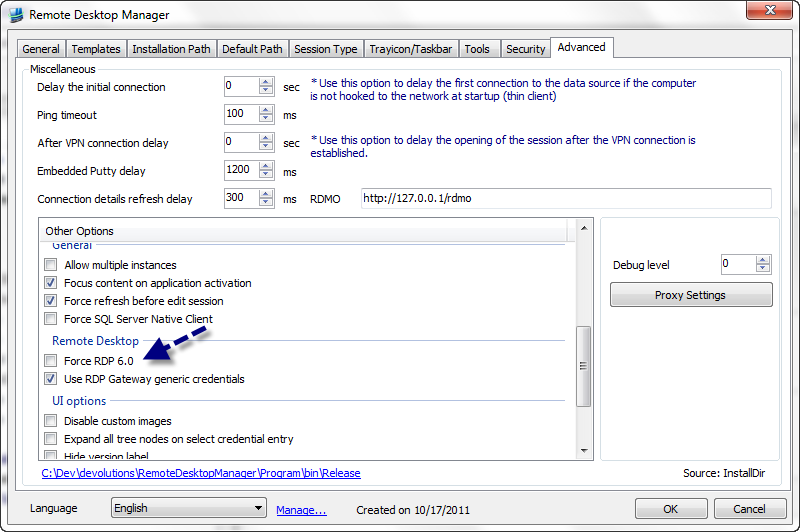
This mean that you already have the latest RDP client. Could you try to set in the application option this setting:
David Hervieux
ForceRDP6[1].png
Hi, the option is already set.
From your screenshot, "Force RDP 6.0" is unchecked. Could you check it?
David Hervieux
ah sry, i check it.
