Keepass

Hi,
I have a trail version of the Remote Desktop Manager Professional. We are in a test fase where we want to Export the name, group and UUID Field from Keepass to Remote Desktop connection manager Credential Entries. Is this possible?
Best regards,
Theron68
All Comments (29)
Hi,
I'm not sure of what you want to do. Do you want to link KeePass to RDM like this
http://www.youtube.com/watch?v=OE876qZv_UU&feature=player_embedded
Or you really want to export the data from KeePass and no longer use KeePass?
David Hervieux
Hi,
I've imported usernames and passwords via a csv in Keepass (400 in total). I've done the integration between Keepass and RDM already, by copying the two dll's in the keepass directory. Now I'm creating Credential accounts to make the link between RDM and Keepass. Since Keepass accounts are already created with UUID, I want to export from keepass and import to RDM. But I can't find an
import function for RDM Credential accounts. So is there a possibility?
TIA
Hi,
I understand now. I will take a look if I can create an import add-on for that.
David Hervieux
Hi
Current version of this plugin is not compatible with latest Keepass 2.1.8
Regards
Mariusz
Hi,
The latest KeePass version is 2.17. Could you give me more details?
David Hervieux
Hi,
I just have received the notification for KeePass 2.1.18. I will try it and see what could be the problem. Thank you
David Hervieux
Hi,
I just have tested and it works fine with the version 2.1.18.
David Hervieux
Hello.
I reinstalled KeePass 2.18, redownload KeePass plugin from http://remotedesktopmanager.com/remotedesktopmanager/Support/Keepass, but still I've got this error message:
What am I doing wrong?
Regards
Mariusz
Have you deployed the plugin from Remote Desktop Manager or manually?
David Hervieux
I didn't even know that is another possibility to to install this plugin. I install it according to instruction from http://remotedesktopmanager.com/remotedesktopmanager/Support/Keepass, points 1 and 2.
edited by marlonqpa on 1/9/2012
I would also like to know what the difference is. We are trying to integrate RDM 6.5.1.0 with KeePass 2.1.7 and followed the same instructions. I have created both RDP and Web sessions and tried to link them to KeePass the same way they did in the video, but KeePass is never triggered in the process. I can click the Check button in the Edit Credentials dialog and KeePass does open then and asks for the master password, but nothing is supplied to the session when a session is opened, KeePass does not open, and no error messages are generated. What am I doing wrong?
Mark Holm
ADP
All commenst made are purely my own opinion
Hi,
I suspect that the plugin is not loaded. Could you try to install the version 6.6 and use RDM to deploy the plugin? Just click the "Install Plug-In" button
edited by dhervieux on 1/18/2012
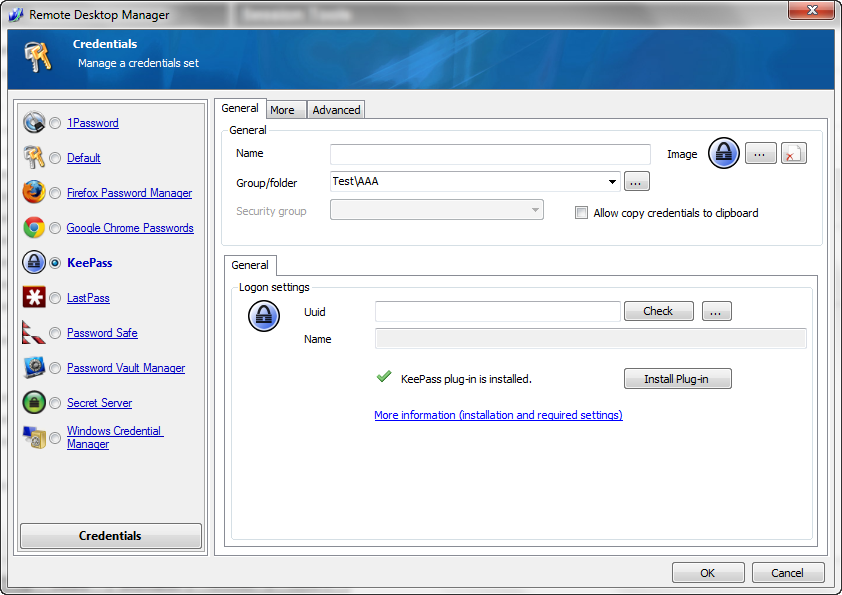
David Hervieux
KeePass.png
Upgrading to 6.6 is not an option just yet, as this is deployed across way too many people and upgrading has a ripple effect typically, forcing everyone to have to update. Doing that just so I can test this feature, would make for a LOT of unhappy people. Is there a way to tell with the version I have if it is deployed correctly? Clicking the check button did open KeePass in my original testing. When I did it just now, I got a pop-up (that was behind everything) for Remote Desktop Manager that said "You first need to open a database". I have a default database in my KeePass setup, do I also have to define one in RDP somewhere? If so, where?
Mark Holm
ADP
All commenst made are purely my own opinion
Could you send me a print screen of your keepass installation folder?
David Hervieux
Sent as a private message.
Mark Holm
ADP
All commenst made are purely my own opinion
I'm trying to install the addon (Keepass 2.19) but it is giving me the error below
"The KeePass application directory seems to be read only. Please close the KeePass application if necessary."
I can run KeePass fine so not sure why it is complain. Initialy I tried pointing RDM to the KeePass portable version folder on the network drive running version 2.18 (which is what we are using at the moment).
Just in case the portable is a problem I installed the latest version of KeePass locally with the above result. There seems to be no way for me to start from scratch installing KeePass?
Hi,
RDM seems to be unable to copy the plugin into the KeePass folder. MAybe you could try to copy it manually.
http://remotedesktopmanager.com/download/Devolutions.RemoteDesktopManager.KeePassPlugin.2.0.0.0.zip
Just make sure to unzip it with the Run As Administrator elevated privilege.
David Hervieux
I copied the 2 files in the zip file to the RDM folder using admin rights, but is still getting the same error. it appears RDM does not recognize that the files are there and say plugin is not installed.
Could you take a look at the application log in Help->View Application Log. Also, could you try the version 7.1?
David Hervieux
I'm running version 7.1.0.0 of RDM. Application log is below:
-----
[5/15/2012 4:54 PM]ERROR System.ObjectDisposedException: Cannot access a disposed object.
Object name: 'FrmMainDockable'.
at System.Windows.Forms.Control.CreateHandle()
at System.Windows.Forms.Form.CreateHandle()
at System.Windows.Forms.Control.get_Handle()
at System.Windows.Forms.Control.GetSafeHandle(IWin32Window window)
at System.Windows.Forms.Form.ShowDialog(IWin32Window owner)
at Devolutions.RemoteDesktopManager.Managers.RegistrationManager.CheckRegisterStandard()
at Devolutions.RemoteDesktopManager.Forms.FrmMainBase.CheckRegistration()
at Devolutions.RemoteDesktopManager.Forms.FrmMainDockable.FrmMain_Shown(Object sender, EventArgs e)
at System.Windows.Forms.Form.OnShown(EventArgs e)
at System.Windows.Forms.Form.CallShownEvent()
at System.Windows.Forms.Control.InvokeMarshaledCallbackDo(ThreadMethodEntry tme)
at System.Windows.Forms.Control.InvokeMarshaledCallbackHelper(Object obj)
at System.Threading.ExecutionContext.runTryCode(Object userData)
at System.Runtime.CompilerServices.RuntimeHelpers.ExecuteCodeWithGuaranteedCleanup(TryCode code, CleanupCode backoutCode, Object userData)
at System.Threading.ExecutionContext.RunInternal(ExecutionContext executionContext, ContextCallback callback, Object state)
at System.Threading.ExecutionContext.Run(ExecutionContext executionContext, ContextCallback callback, Object state)
at System.Windows.Forms.Control.InvokeMarshaledCallback(ThreadMethodEntry tme)
at System.Windows.Forms.Control.InvokeMarshaledCallbacks()
[5/30/2012 10:51 AM]ERROR SILENT System.Reflection.ReflectionTypeLoadException: Unable to load one or more of the requested types. Retrieve the LoaderExceptions property for more information.
at System.Reflection.Module._GetTypesInternal(StackCrawlMark& stackMark)
at System.Reflection.Assembly.GetTypes()
at Devolutions.RemoteDesktopManager.Managers.AddOnManager.Load()
[5/30/2012 11:05 AM]ERROR SILENT System.Reflection.ReflectionTypeLoadException: Unable to load one or more of the requested types. Retrieve the LoaderExceptions property for more information.
at System.Reflection.Module._GetTypesInternal(StackCrawlMark& stackMark)
at System.Reflection.Assembly.GetTypes()
at Devolutions.RemoteDesktopManager.Managers.AddOnManager.Load()
From KeePass, you get the message that the add-on is not installed. Could you post a print screen. I really don't understand and I think that the next step will be to send you a special build with debug info
David Hervieux
Sorry I mean, from the Credential Screen in RDM and not from KeePass
David Hervieux
Screenshot here http://imageshack.us/photo/my-images/840/rdmerror.jpg/
Sorry again, could you post a print screen of the KeePass installation folder content?
David Hervieux
Could you try to install KeePass in "Program Files (x86)" instead of "Program Files". It might be related to the fact the RDM is a 32 bit application
edited by dhervieux on 5/31/2012
David Hervieux
The version of windows I'm running is 32 bit so that should not make a difference.
I understand. I have made a special build with some debug info. Could you give it a try:
http://remotedesktopmanager.com/download/Devolutions.RemoteDesktopManager.Bin.7.1.3.0a.zip
Just open a KeePass credential and copy the messages (use ctrl+c to copy them)
Regards
David Hervieux
Sorry I've been busy and have not had a chance to try this yet. I will update as soon as I have try it.
