Status for rasdial.exe VPN connections?
0 vote

Hi!
Often times when I connect to a VPN session using Microsoft VPN, and something goes wrong, it simply closes tche session without providing any error information.
Would it be possible to display the output of rasdial.exe in the "Opening VPN connection" window, and keep any error messages visible?
thanks!
All Comments (26)
Hi,
I will try to add this. You are right this might help.
David Hervieux
this would defnetly be nice, so you don't have to do the workaround with the rasdial.exe -f
Sorry for the question but what does -f do?
David Hervieux
I think he means rasphone.exe -f, which you use to specify the .pbk file to load.
Actually this would be a solution! just use rasphone instead of rasdial, then we get a GUI and error message from Windows.
edited by alphanimal on 8/27/2011
I recently had some VPN troubles again and thought about this thread :)
Any chance of getting this implemented?
Cheers!
Daniel
Hi,
It's now implemented and it will be in the next beta release. It's now an option in the configuration to display the output when the connection fails
edited by dhervieux on 12/31/2011
David Hervieux
Hi!
thanks for the update!
Being able to see errors is very useful!
One minor problem:
The character encoding seems to be wrong when you display the message from rasdial.exe. All those '?' should be German Umlaut characters or ß (Eszett)
Also I was hoping you could use rasphone.exe instead of rasdial.exe so we can actually see Windows' status window and error messages.
Also what's a bit inconvenient, is that RDM doesn't know if a VPN is already active or not.
Example: You open session A, VPN gets connected, then you open session B, which dies not connect VPN since it can already reach the host.
Then you close session A, RDM asks if you want to close VPN, but you say No because you still work on session B.
Then you clode session B, but since it didn't connect a VPN in the firct place, the VPN stays open and there's no easy way to close it.
All the VPN connecting/disconnecting could be managed a bit better imho.
Thanks for all your support so far! Your product is really useful for us.
Have a happy new year!
cheers,
Daniel
Hi,
I will verify what I can do for the encoding problem. For rasphone, have you try to check the option "Use rasphone (Connection Adminsitrator Kit)". Have you try to link you VPN with a VPN group? This allow you to only close the VPN when all the session are closed. It's in the VPN tab page.
edited by dhervieux on 1/2/2012
David Hervieux
Hi!
The problem with this option (or with using rasphone in general) is that you can't provide credentials from the DB.
Can you explain to me in simple words how VPN groups work or where I can create one? I couldn't find it.
I should rtfm I guess... :)
maybe this helps to handle credentials in rasphone
http://msdn.microsoft.com/en-us/library/windows/desktop/aa377811%28v=vs.85%29.aspx
Thank you for the API, I will try to find a little hour to do a test with it. For the VPN group, it's simple. You set a name to a group to create the link. If a session with a VPN Group is already opened, the application increase the counter and wait for all the session to be closed to finally close the VPN.
Just be careful. I've found little bug with the enable of the VPN Group, just click twice on the close combo session to enable it. This will be resolved in the next beta
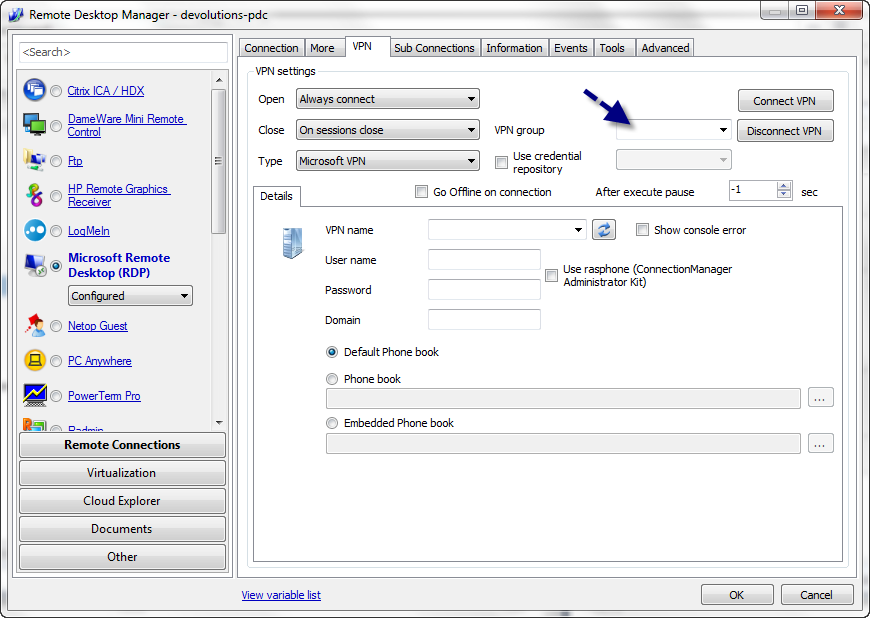
David Hervieux
VPNGroup.png
I see it's actually just a timeout and sometimes (when internet bandwidth is low) I get an error box saying "Connecting ..."
No real problem but it feels a bit weird/unfinished in combination with the encoding problem :)
So, if you somehow manage to get the rasphone API working, that would be awesome.
This would make managing VPNs so much easier.
Another small sugegstion:
In the MS VPN Type, where you select the .pbk file, you could add an Edit button that opens the .pbk file in rasphone, so the user can easily edit it.
Thanks and have a nice day!
Daniel
Oh and big thanks for the hint with the VPN Group. Works like a charm
Hi,
I have added the edit button and also I think (I can't test it) that I have resolved the encoding issue. This will be in the next beta release.
David Hervieux
Thanks! The edit button works well. I'd put it next to the pbk file box though (you edit the whole file, not only one entry)
The encoding is still not right.
Attached is the raw output from my rasdial.exe. Should be ANSI.
rasdial_raw_output.txt
Thank you. I have changed to ANSI this time.
David Hervieux
For the edit button, your right that for editing the whole file but I was not sure how to put it because you can edit the selected ppk and the default also.
David Hervieux
Alright thanks!
Oh I see, it's perfect then :)
Could you try this updated binaries (same version but with the encoding fix):
http://remotedesktopmanager.com/download/Devolutions.RemoteDesktopManager.Bin.6.9.7.0.zip
David Hervieux
The encoding seems still wrong here.
I figured out the encoding coming from rasdial.exe (or any command line program?) is an ASCII / DOS encoding.
It should work with any common DOS encoding, for example CP437 (DOS US) CP850 (DOS Latin 1) or CP852 (DOS Latin 2)
to check, 0x81 must translate to ü
attached you find another raw output from my rasdial.exe
this is how it should look like when decoded correctly:
rasdial.txt
The one I was using was CP1252 but it does not seem to work
David Hervieux
Hi,
You will be able to specify the codepage in the next version. For now it will be directly in remotedesktopmanager.cfg
CommandLineCodePage
David Hervieux
Just found out something - try this:
Start CMD, type "chcp"
I get "Aktive Codepage: 850.", so for me Latin-1 would be the correct one. I don't know how it behaves on other Windows versions though.
Maybe you could find out cmd's encoding automatically using that command or something similar...
If you execute cmd.exe with the /u parameter, any output will be encoded in UTF-16 btw.
maybe that's a simpler solution. But I guess you don't start cmd directly from RDM, but rasdial.exe
Hi,
The setting will be there but I will set it as CP 850 by default now
David Hervieux
OK, great! thanks!
